Tampilkan postingan dengan label Sistem Operasi. Tampilkan semua postingan

02 Januari 2011

Downgrade Lenovo G450 ke Windows XP

0 komentar

Semaleman habis taun baru, malam ini ato lebih cocok dini hari ini udah hari minggu. Dua malem begadang terus gimana g' makin kurus nih badan. .... hmmm.. [cerita apa'an nih g' nyambung ma judul diatas..... heheheh]. Ok deh gw mo bagi-bagi pengalaman buat temen2 yang punya laptop Lenovo seri G450 yang mau downgrade dari win 7 ato vista, lebih baik dipikirin betul2..... tapi lo emang lebih nyaman pake XP ini trik install drivernya gw kasih tau... coz pengalaman gw nginstall nih laptop lumayan bikin puyeng...... :D
Ok... next kita ke TKPnya aja.... :)
1. Sebelum di downgrade ke XP, setting BIOSnya dulu. yang disetting adalah SATA Mode-nya.


2. Jangan lupa simpan Configurasinya dengan menekan tombol F10, masukin deh CD instalasi Windows XPnya

3. Ikutin aja tuh perintah instalasinya sampe selesai ya.....

4. Kalo instal XPnya udah selesai download dulu nih drivernya disini "Lenovo Driver" 

5. Selesai didownload, instal dulu Audionya. Coz masalah downgrade ke Xp disini biasanya terjadi..... untuk install audio diperintahkan oleh Lenovo untuk menginstall .Net Framework dulu, tapi Framework yang disertakan oleh Lenovo g' support ato gagal kalo diinstal. untuk ngatasin Audionya ini langkah yang mesti dilakuin.
- Download dan install kb888111xpsp2.exe / install MS Audio.
- Restart
- Setelah restart baru install Sound Driver yang udah didownload tadi....
- Restart Lagi

Kalo lo gagal, sebelumnya udah ada install drivernya belum.... kalau sudah, uninstall dulu driver tersebut, usahakan setelah selesai install windows XP langsung install Sound drivernya dulu.....

Ok sedikit tips dari saya semoga bermanfa'at dan tidak mengalami seperti yang saya alami.... :D
»»  Selengkapnya...

21 Desember 2010

Installasi Sistem Operasi Windows XP Professional

0 komentar
Postingan ini sudah banyak sekali blogger yang membuatnya, tapi saya ingin mengulas kembali tentang installasi sistem operasi karena masih banyak temen2 yang masih bingung dan takut-takut untuk melakukan installasi terhadap komputer ataupun notebooknya sendiri.

Ok postingan kali ini juga sekaligus mengobati kangenku buat ngeblog, udah lama banget nih g' buka my blog :D hehehehe..... 

singkat cerita aja ya..... ok, langsung masuk aj ke pokok bahasan kita kali ini.

ini dia langkah-langkah installasinya :D

1.        Atur booting  awal komputer pada BIOS (Basic Input Output System) menjadi CD-ROM,  seperti terlihat pada gambar berikut :
 Gambar 1 Pengaturan First Boot Device Pada BIOS
2.        Restart komputer dan tunggu beberapa saat sampai muncul tulisan “press any key to boot from CD” seperti terlihat pada gambar berikut ini :
 Gambar 2 Press Any Key To Boot From CD
3.        Tekan tombol “enter” pada keyboard, proses installasi akan mengecek hardware komputer dan kemudian muncul tulisan “windows setup” seperti terlihat pada gambar berikut.
Gambar 3 Windows Setup
4.        File-file didalam CD akan diload ke dalam komputer, kemudian akan muncul tampilan “welcome to setup” seperti terlihat pada gambar berikut.
 Gambar 4 Welcome To Setup
5.        Tekan tombol “enter” untuk menginstall sistem operasi windows xp professional, tombol “R” untuk repair system windows yang sebelumnya pernah terinstall, dan tombol “F3” untuk keluar dari proses installasi, lalu akan muncul “windows XP licensing agreement” seperti terlihat pada gambar  dibawah ini.
 Gambar 5 Windows XP Licensing Agreement
6.        Tekan tombol “F8” kemudian proses installasi akan mencari dan membaca partisi harddiskseperti telihat pada gambar berikut.
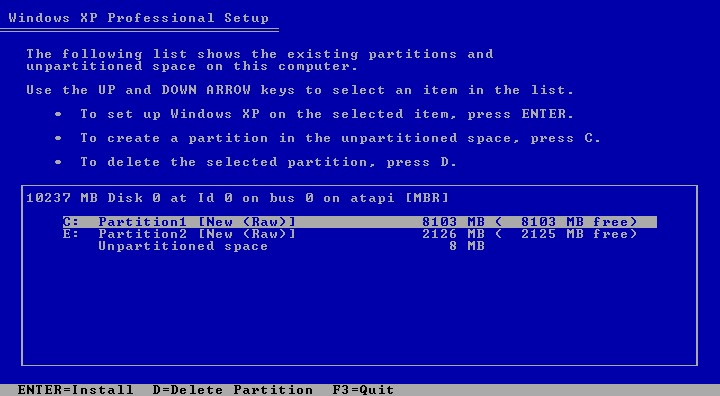
 Gambar 6 Partisi Harddisk
7.        Tekan tombol “enter” untuk langsung menginstall windows, tombol “C” untuk membuat partisi harddisk yang baru. Kapasistas partisi disesuaikan dengan kebutuhan, seperti terlihat pada gambar  berikut.


 Gambar 7 Membuat Partisi Harddisk
8.        Isikan kapasitas partisi yang ingin dibuat, kemudian tekan “enter” untuk meng-create partisi. Tekan tombol “enter” sekali lagi untuk melanjutkan proses installasi. Maka akan muncul pilihan installasi seperti terlihat pada gambar.
Gambar 8 Pilihan Installasi
9.        Pilih salah satu dari pilihan yang disediakan, kemudian tekan “enter”, proses akan memformat partisi yang dipilih untuk tempat installasi. Selanjutnya akan terlihat seperti pada gambar.
Gambar 9 Format Partisi
10.    Setelah selesai memformat partisi harddisk, kemudia windows akan menyalin file untuk proses installasi seperti terlihat pada gambar dibawah ini.
Gambar 10 Copy File Windows
11.    Setelah proses penyalinan selesai, secara otomatis komputer akan restart dan kemudian akan muncul tampilan windows loading seperti gambar berikut.

Gambar 11 Windows Restart
Gambar 12 Windows Loading
 12.    Selanjutnya proses installasi windows akan muncul tampilan seperti gambar dibawah ini
 Gambar 13 Installasi Windows
13.    Proses yang terjadi pada langkah ke-12 terjadi selama 39 menit, dan dalam waktu tersebut ada beberapa langkah lagi yang harus dilakukan sementara pada sisa waktu lainnya hanya tinggal menunggu hingga proses installasi selesai. Langkah yang akan dilakukan dalam kurun waktu 39 menit adalah mengatur nama untuk registrasi komputer yang digunakan dan mengisikan lisensi serial number dari windows seperti terlihat seperti pada gambar berikut ini. 
 Gambar 14 Pengisisan Registrasi Komputer Dan Lisensi Windows
14.    Setelah mengisikan lisensi windows, proses akan melanjutkan ke pengaturan nama komputer dan password administrator serta pengaturan tanggal dan waktu. Untuk pengaturannya dapat dilihat pada gambar berikut ini.
Gambar 15 Pengisian Nama Komputer
15.    Tunggu beberapa menit lagi sampai proses installasi selesai, dan komputer kembali akan restart dan akan menampilkan tampilan seperti pada gambar berikut ini.
      Gambar 16 Display Setting Dan Monitor Setting
       Klik tombol “ok” seperti pada gambar di atas dan proses installasi sistem operasi telah selesai. Kemudian akan muncul tampilan seperti pada gambar dibawah ini.
Gambar 17 Konfigurasi Awal Windows XP
16.    Klik tombol “next” dan akan muncul tampilan help protect your PC. Pada tampilan ini pilih opsi “not right now” kemudian klik tombol “next” kembali untuk melanjutkan proses installasi.
Gambar 18 Help Protect Your PC
17.    Selanjutnya akan tampil pilihan koneksi internet, pada tampilan ini klik tombol “skip” dan akan muncul pilihan registrasi Microsoft. Pilih opsi “no, not at this time” kemudian klik “next” maka akan muncul tampilan pengguna komputer, isikan nama pengguna / user lalu klik “next” untuk menyelesaikan proses installasi.

Gambar 19 Pengisian Nama User
18.    Komputer telah selesai diinstall, klik tombol “finish” pada tampilan seperti gambar berikut.
Gambar 20 Installasi Sistem Operasi Selesai
            Setelah selesai proses installasi sistem operasi pada komputer, tampilan awal windows dapat dilihat pada gambar dibawah ini,


Nah untuk temen-temen yang masih bingung dengan penjelasan diatas, temen-temen bisa download video tutorial installasinya disini trus gabungin pake HJsplit ya..., atau download file PDFnya.

selamat mencoba.... semoga berhasil jika ada keluhan silahkan tinggalkan komentar ya..... :)
*Note : Pass unlocknya tanya via e-mail saya di toyman.care@gmail.com
 

»»  Selengkapnya...

27 Juni 2009

Download Linux n' Request CD linux...

0 komentar
Wuah... masih banyak temen - temen belom tau nih download linux gratis dari server Indo poenya. Padahal lo tahu puas deh tuh dijejelin linux tiap hari.... he..he.he... :D. Mendukung program Pemerintah yang "Goes Open Source" masih banyak temen - temen yang belum tahu gimana ya cara dapetin linux secara cuma2...

Nah buat yang hobi banget download keknya udah g' perlu dikasih tahu linknya... Coz udah dijelajahin smua tuh yang berbau download. yah walupun cuman numpang lewat doank... tapi buat temen - temen yang laen... nih akuh kasih link buat download macem - macem linux yang temen - temen inginkan... :D

1. http://kambing.ui.edu/
2. http://repo.ugm.ac.id/
3. http://fedoraproject.org/get-fedora


Atau langsung ke ftp://repo.ugm.ac.id/ kesini juga ftp://rpmfind.net/linux/0/redhat-archive/ yang ini juga debian.org


Kalau pengen Request CDs gratisan punya Ubuntu, Kubuntu, n' Edubuntu disini :
1. Request CDs of Ubuntu
2. Request CDs of Kubuntu
3. Download CDs Edubuntu
4. Request CD Mandriva

Ok selamat berlinux Ria..... :D
»»  Selengkapnya...

07 Mei 2009

W!ndows Server 2003 Special Edition CD [10 in 1]

1 komentar

Windows Server 2003 (Standard / Enterprise / Datacenter / Web / SBS)
Windows Server 2003 VLM (Standard / Enterprise / Datacenter / Web / SBS)
Microsoft Windows Server 2003 Enterprise Edition is the premier platform for business-critical applications.
Windows Server 2003 Enterprise Edition builds on the standard features found in the Windows Server 2003 family by adding features designed to increase the reliability scalability, security, and manageability of enterprise applications.
This version of Windows 2003 Enterprise is direct from Microsoft, with Service Pack 2 integrated. It is also corporate, so no activation is necessary.


http://www.egoshare.com/download.php?id=71XNJ2L98
http://www.egoshare.com/download.php?id=86HQF6E95
http://www.egoshare.com/download.php?id=97VZN5I58
http://www.egoshare.com/download.php?id=79IUN4B01
http://www.egoshare.com/download.php?id=80NRN4N49
http://www.egoshare.com/download.php?id=01SXT0F02
http://www.egoshare.com/download.php?id=12GKR8Y35
OR
http://depositfiles.com/files/vrz5yhml6
http://depositfiles.com/files/rkw70wqxl
http://depositfiles.com/files/h4knjqc8w
http://depositfiles.com/files/1yy39qae6
http://depositfiles.com/files/rr3lgt29w
http://depositfiles.com/files/3e8966ixe
http://depositfiles.com/files/dwhvdvvmj
OR
http://rapidshare.com/files/196676200/W2K310I1.part1.rar
http://rapidshare.com/files/196676274/W2K310I1.part2.rar
http://rapidshare.com/files/196676089/W2K310I1.part3.rar
http://rapidshare.com/files/196676236/W2K310I1.part4.rar
http://rapidshare.com/files/196676197/W2K310I1.part5.rar
http://rapidshare.com/files/196676475/W2K310I1.part6.rar
http://rapidshare.com/files/196675563/W2K310I1.part7.rar


»»  Selengkapnya...

Microsoft.Windows Server 2008 12in1 MSDN DVD-CRBS [MediaFire]

2 komentar

This DVD is NOT homemade, it's the MSDN media subscribers version (not available in msdn downloads), part #X14-82292. Bootable and working. Enjoy.Unpack, install. GoogleCr@ck patches wga too, read txt from /Cr@ck before patching.

Windows Server 2008 Standard (x86 and x64)
Windows Server 2008 Enterprise (x86 and x64)
Windows Server 2008 Datacenter (x86 and x64)
Windows Server 2008 Standard (Server Core) (x86 and x64)
Windows Server 2008 Enterprise (Server Core) (x86 and x64)
Windows Server 2008 Datacenter (Server Core) (x86 and x64)

:dl:

Code:

Part 1: http://www.mediafire.com/?tjzozut1pcb
Part 2: http://www.mediafire.com/?0cj3dbu2qz1
Part 3: http://www.mediafire.com/?gzmzibmhanl
Part 4: http://www.mediafire.com/?m2yz2ssueng
Part 5: http://www.mediafire.com/?dnksyi51yzt
Part 6: http://www.mediafire.com/?l1ryt3ojrvs
Part 7: http://www.mediafire.com/?tny1v1xai0z
Part 8: http://www.mediafire.com/?zmjhmybywjz
Part 9: http://www.mediafire.com/?1mgsb2miney
Part 10: http://www.mediafire.com/?wklwvhmuodp
Part 11: http://www.mediafire.com/?gj0h2am1a2j
Part 12: http://www.mediafire.com/?jlzmydsy1lb
Part 13: http://www.mediafire.com/?utplz2ynvqj
Part 14: http://www.mediafire.com/?9tflwmrj1oq
Part 15: http://www.mediafire.com/?bo22np2btea
Part 16: http://www.mediafire.com/?78ynzsv0cb1
Part 17: http://www.mediafire.com/?m22q1il1eb4
Part 18: http://www.mediafire.com/?vgodwdxyxey
Part 19: http://www.mediafire.com/?gan1vidogo8
Part 20: http://www.mediafire.com/?o12thok2b9r
Part 21: http://www.mediafire.com/?ofzgi0bw4wo
Part 22: http://www.mediafire.com/?s1ebz0yyefi
Part 23: http://www.mediafire.com/?bwtzzfv0mxb
Part 24: http://www.mediafire.com/?wqbugewcgya
Part 25: http://www.mediafire.com/?l0hlhvw0m1n
Part 26: http://www.mediafire.com/?6d1vvzww5mv
Part 27: http://www.mediafire.com/?12vebm1me1z
Part 28: http://www.mediafire.com/?ve62wclpm0v
Part 29: http://www.mediafire.com/?gomfautz9tw

:rs:

Code:

http://rapidshare.com/files/198290566/WS2k8_12in1.part01.rar
http://rapidshare.com/files/198290536/WS2k8_12in1.part02.rar
http://rapidshare.com/files/198335721/WS2k8_12in1.part03.rar
http://rapidshare.com/files/198290609/WS2k8_12in1.part04.rar
http://rapidshare.com/files/198290533/WS2k8_12in1.part05.rar
http://rapidshare.com/files/198291182/WS2k8_12in1.part06.rar
http://rapidshare.com/files/198291169/WS2k8_12in1.part07.rar
http://rapidshare.com/files/198291108/WS2k8_12in1.part08.rar
http://rapidshare.com/files/198291084/WS2k8_12in1.part09.rar
http://rapidshare.com/files/198291159/WS2k8_12in1.part10.rar
http://rapidshare.com/files/198291485/WS2k8_12in1.part11.rar
http://rapidshare.com/files/198291496/WS2k8_12in1.part12.rar
http://rapidshare.com/files/198291507/WS2k8_12in1.part13.rar
http://rapidshare.com/files/198291517/WS2k8_12in1.part14.rar
http://rapidshare.com/files/198291448/WS2k8_12in1.part15.rar
http://rapidshare.com/files/198291795/WS2k8_12in1.part16.rar
http://rapidshare.com/files/198291745/WS2k8_12in1.part17.rar
http://rapidshare.com/files/198291892/WS2k8_12in1.part18.rar
http://rapidshare.com/files/198291827/WS2k8_12in1.part19.rar
http://rapidshare.com/files/198291858/WS2k8_12in1.part20.rar
http://rapidshare.com/files/198292411/WS2k8_12in1.part21.rar
http://rapidshare.com/files/198292667/WS2k8_12in1.part22.rar
http://rapidshare.com/files/198292568/WS2k8_12in1.part23.rar
http://rapidshare.com/files/198292388/WS2k8_12in1.part24.rar
http://rapidshare.com/files/198292475/WS2k8_12in1.part25.rar
http://rapidshare.com/files/198292836/WS2k8_12in1.part26.rar
http://rapidshare.com/files/198292840/WS2k8_12in1.part27.rar
http://rapidshare.com/files/198292870/WS2k8_12in1.part28.rar
http://rapidshare.com/files/198292702/WS2k8_12in1.part29.rar


»»  Selengkapnya...

Windows XP With Service Pack 3 for Laptop Collection 2

0 komentar

With Windows XP Professional Edition with Service Pack 3, you get safer browsing and communication, powerful security tools, and improved experiences. Windows XP is the operating system release that unifies the Microsoft range, with all the desktop versions now built on the NT/2000 code base rather than the shakier foundation of Windows 95, 98, and Me. That makes XP a great upgrade for users of the now-obsolete 9x and Me line, but for those already on Windows 2000 Professional it is a closer call. Despite the similar name, there is no special synergy between Windows XP and Office XP, which works fine on Windows 2000.
Support for: Acer, Dell, HP-Compaq, IBM-Lenovo, Sony, Toshiba
Download :
http://www.filefactory.com/file/af402bf/n/L_Collection_2_txt
Uploaded.To
http://uploaded.to/?id=aolr3s
NetLoad
http://netfolder.in/folder.php?folder_id=rm0vkRD
»»  Selengkapnya...

Microsoft Windows XP Professional With SP3 X86 Sony Edition

0 komentar

Microsoft Windows XP Professional with Service Pack 3 for Laptop Collection
http://www.easy-share.com/1903979302/WXP.SON.SP3.part1.rar
http://www.easy-share.com/1903979311/WXP.SON.SP3.part2.rar
http://www.easy-share.com/1903979326/WXP.SON.SP3.part3.rar
http://www.easy-share.com/1903979332/WXP.SON.SP3.part4.rar
http://www.easy-share.com/1903979369/WXP.SON.SP3.part5.rar
http://www.easy-share.com/1903979425/WXP.SON.SP3.part6.rar
http://www.easy-share.com/1903979475/WXP.SON.SP3.part7.rar
OR
http://uploading.com/files/31464KT0/WXP.SON.SP3.part1.rar.html
http://uploading.com/files/ZTVRML3B/WXP.SON.SP3.part2.rar.html
http://uploading.com/files/9HKL6TA0/WXP.SON.SP3.part3.rar.html
http://uploading.com/files/TNXD2ZJT/WXP.SON.SP3.part4.rar.html
http://uploading.com/files/G8OY2U0T/WXP.SON.SP3.part5.rar.html
http://uploading.com/files/KQRPU4S1/WXP.SON.SP3.part6.rar.html
http://uploading.com/files/C9SX5LQD/WXP.SON.SP3.part7.rar.html
OR
http://depositfiles.com/files/ubs2g1xjc
http://depositfiles.com/files/j6l7fr5tg
http://depositfiles.com/files/pv80kjsc9
http://depositfiles.com/files/pw2s106qr
http://depositfiles.com/files/jwcqzp1dd
http://depositfiles.com/files/wwrtpq6df
http://depositfiles.com/files/6j0fb5mcx
OR
http://rapidshare.com/files/207789893/WXP.SON.SP3.part1.rar
http://rapidshare.com/files/207789887/WXP.SON.SP3.part2.rar
http://rapidshare.com/files/207789895/WXP.SON.SP3.part3.rar
http://rapidshare.com/files/207789881/WXP.SON.SP3.part4.rar
http://rapidshare.com/files/207789882/WXP.SON.SP3.part5.rar
http://rapidshare.com/files/207789886/WXP.SON.SP3.part6.rar
http://rapidshare.com/files/207789629/WXP.SON.SP3.part7.rar

»»  Selengkapnya...

Microsoft Windows XP Professional With SP3 X86 Toshiba Edition

0 komentar

Microsoft Windows XP Professional with Service Pack 3 for Laptop Collection
http://www.easy-share.com/1903977684/WXP.TOS.SP3.part1.rar
http://www.easy-share.com/1903977691/WXP.TOS.SP3.part2.rar
http://www.easy-share.com/1903977706/WXP.TOS.SP3.part3.rar
http://www.easy-share.com/1903977733/WXP.TOS.SP3.part4.rar
http://www.easy-share.com/1903977800/WXP.TOS.SP3.part5.rar
http://www.easy-share.com/1903977807/WXP.TOS.SP3.part6.rar
http://www.easy-share.com/1903977810/WXP.TOS.SP3.part7.rar
OR
http://uploading.com/files/34N0ZBG3/WXP.TOS.SP3.part1.rar.html
http://uploading.com/files/NWHE9K3W/WXP.TOS.SP3.part2.rar.html
http://uploading.com/files/312JSRQJ/WXP.TOS.SP3.part3.rar.html
http://uploading.com/files/L2H7HDXL/WXP.TOS.SP3.part4.rar.html
http://uploading.com/files/ASPWPZ3M/WXP.TOS.SP3.part5.rar.html
http://uploading.com/files/87OSNVH3/WXP.TOS.SP3.part6.rar.html
http://uploading.com/files/2ZVNQX23/WXP.TOS.SP3.part7.rar.html
OR
http://depositfiles.com/files/fehdznx1l
http://depositfiles.com/files/z91ko24h0
http://depositfiles.com/files/5ipgvpvo4
http://depositfiles.com/files/plh4cgtbk
http://depositfiles.com/files/k9lj347ab
http://depositfiles.com/files/npg68zjhd
http://depositfiles.com/files/kea1hc3fo
OR
http://rapidshare.com/files/207765541/WXP.TOS.SP3.part1.rar
http://rapidshare.com/files/207765539/WXP.TOS.SP3.part2.rar
http://rapidshare.com/files/207765530/WXP.TOS.SP3.part3.rar
http://rapidshare.com/files/207765532/WXP.TOS.SP3.part4.rar
http://rapidshare.com/files/207765529/WXP.TOS.SP3.part5.rar
http://rapidshare.com/files/207765548/WXP.TOS.SP3.part6.rar
http://rapidshare.com/files/207765254/WXP.TOS.SP3.part7.rar

»»  Selengkapnya...

Windows XP Professional SP3 Corporate March 2009

0 komentar

V2C47-MK7JD-3R89F-D2KXW-VPK3J
DHXQ2-WRGCD-WGYJY-HHYDH-KKX9B
http://www.easy-share.com/1903928925/WXP.C.SP3.M2K9.part1.rar
http://www.easy-share.com/1903928841/WXP.C.SP3.M2K9.part2.rar
http://www.easy-share.com/1903928984/WXP.C.SP3.M2K9.part3.rar
http://www.easy-share.com/1903929016/WXP.C.SP3.M2K9.part4.rar
http://www.easy-share.com/1903929047/WXP.C.SP3.M2K9.part5.rar
http://www.easy-share.com/1903929359/WXP.C.SP3.M2K9.part6.rar
http://www.easy-share.com/1903929368/WXP.C.SP3.M2K9.part7.rar
OR
http://www.egoshare.com/download.php?id=63UBN9Q30
http://www.egoshare.com/download.php?id=22TXF0Q35
http://www.egoshare.com/download.php?id=36WHD0M24
http://www.egoshare.com/download.php?id=32CVA0Z51
http://www.egoshare.com/download.php?id=26BGH1E60
http://www.egoshare.com/download.php?id=12YKL2W52
http://www.egoshare.com/download.php?id=58FBT0W30
OR
http://depositfiles.com/files/vk96kac26
http://depositfiles.com/files/rhdh83el1
http://depositfiles.com/files/l003zi2wy
http://depositfiles.com/files/pw6ds2ia4
http://depositfiles.com/files/kjllczwek
http://depositfiles.com/files/pb8hsq37n
http://depositfiles.com/files/lseguarxu
OR
http://www.megaupload.com/?d=3KTSQPKY
http://www.megaupload.com/?d=4UHHIMMW
http://www.megaupload.com/?d=QXG2YI01
http://www.megaupload.com/?d=L6MWY54P
http://www.megaupload.com/?d=F1N44GHD
http://www.megaupload.com/?d=57MRTFFV
http://www.megaupload.com/?d=YZLQ3PZ3
OR
http://rapidshare.com/files/206345816/WXP.C.SP3.M2K9.part1.rar
http://rapidshare.com/files/206346342/WXP.C.SP3.M2K9.part2.rar
http://rapidshare.com/files/206346284/WXP.C.SP3.M2K9.part3.rar
http://rapidshare.com/files/206346207/WXP.C.SP3.M2K9.part4.rar
http://rapidshare.com/files/206346193/WXP.C.SP3.M2K9.part5.rar
http://rapidshare.com/files/206345880/WXP.C.SP3.M2K9.part6.rar
http://rapidshare.com/files/206345654/WXP.C.SP3.M2K9.part7.rar

»»  Selengkapnya...

Windows XP Professional SP3 VL x86 April 2009 [MediaFire]

0 komentar
Details:
»»  Selengkapnya...

06 Mei 2009

Windows XP SP3 Original MS Release [MediaFire]

2 komentar
»»  Selengkapnya...

05 Mei 2009

Windows XP SP3 WIN7 STYLE 2009 v.18.1 CD

0 komentar


Windows XP SP3 WIN7 STYLE 2009 v.18.1

In connection with the emergence of a new operating system WINDOWS7 is not all it is available, and many difficult to restructure, but almost everyone's taste and style design of the new operating system. The authors therefore decided to introduce a maximum indentichnosti style WIN7 in the corporate version of the Russian Microsoft Windows © XP SP3 Professional, include all available updates for the year 16.01.2009, v. e integrated into the system last apdeytpak of Dzheymszero UpdatePack-XPSP3-Rus-9.1.16 2009.
Year: 2009
Version: SP3
Size: 697 MB
Platform: PC
Compatibility with Vista: No
System requirements: Minimum.
Language: Russian only
Tabletka: Present
Developer: putnik
Disk multizagruzochny, included the aforementioned apdeytpak and extrimpack; © dimadr aka snake 16.07.2008 repack Secmac 19.11.2008
Building with original style and design, to optimize tvikami at work on weak machines, as well as a collection of professional Acronis BootCD Professional, which consists of:
True Image HOME Rus v.11.0.8059_RU (Full & Safe mode) with Universal Restore,
Disk Director Suite v. 10.0.2117 Rus (Full & Safe mode)

The development of the project has the active participation of a talented artist and designer AVAnto. The style of building has a maximum similarity with the new operating system Windows7. To ensure that the quality of the assembly not assigned appearance was held optimization system.
MD5 ISO: FE41D7DC688903E234012E3720F4DEA1
Updates
KB889320-v2 KB922120-v6 KB932521 KB932716-v2 KB934401 KB942213-v2 KB944043-V3
KB945015-v2 KB945060-V3 KB945436 KB947460-v2 KB948046-v2 KB948101-v3 KB948277
KB948698 KB948720 KB948877-v2 KB949033 KB949127-v2 KB949764 KB949900 KB950234
KB950312 KB950616 KB950982 KB951072-v2 KB951163 KB951312 KB951347 KB951531-v2
KB951618-v2 KB951624 KB951709 KB951822-v2 KB952020-v2 KB952079-v2 KB952117-v2 KB952206
KB952287 KB952909-v2 KB953024 KB953028 KB953155 KB953609 KB953760 KB953761
KB953929 KB953930 KB954193 KB954232 KB954434 KB954459 KB954708 KB954879
KB954920-v2 KB955043-v2 KB955069 KB955109 KB955408 KB955567 KB955576 KB955832-v2
KB955843-v4 KB955988 KB956072 KB956588 KB956625 KB956803 KB956807 KB956841
KB957095 KB957097 KB957201 KB957218 KB957263 KB957264 KB957495 KB957808
KB958071 KB958149 KB958200 KB958244 KB958282-v2 KB958347 KB958644 KB958817
Setting
Fully automatic
At the pre-selected section and the method of formatting. In the BIOS pre vystavlyaem first boot from CD-ROM. Reboot, and if you ask the disc press ENTER. Installation of automatic (for the T13 may be a delay-wait-all will be). Predostalena opportunity (WINNT SIF Editor) entering the organization, change the key to its (proposed valid), the selection of the region, the keyboard layout. Provided a choice of drivers (the list above). The first, second frameworks are established automatically no longer stavil.Izvinite is a CD.
Subject to default - Zune
Enter a classic under his own name. (OOVE - a style of decoration).
In order to display sleep mode (to whom it should be) after installation go to papkuWindows and let there reg file-MSGINA.
By the individual characteristics of the assembly includes avtoran new generation (of development based on the author and designer Prokazza)
Given the opportunity to install out of the old OS.Pri that will need to enter the switch-keys on the disc.
Version corporate-activation is not required. Being tested (for the moment) to offsayte.
Integrated Addons
Addons \ DelVideoDrv
Addons \ Z_DRV_INST
Addons \ 1-BaseCSP
Addons \ 1-Flash
Addons \ 1-GPPC
Addons \ 1-IMAPI2
Addons \ 1-LLTD
Addons \ 1-MSXML
Ad dons \ 1-MU
Addons \ 1-PkgInst
Addons \ 1-Rootsupd
Addons \ 1-WGA
Addons \ 3-dllsfull
Addons \ 3rdparty
Addons \ 9-WMP11RUS
Addons \ Akelpad
Addons \ amlmaple
Addons \ AntiSpy_397b3
Addons \ Autorun5_7W
Addons \ CabTools
Addons \ CCleaner
Addons \ CPLDAPU
Addons \ Cur12
Addons \ Del MSNExplr
Addons \ Del Pinball
Addons \ Del ZoneGames
Addons \ Del_MultiPort29012008
Addons \ Del_prn_02052008
Addons \ Del_Scaner23102007
Addons \ Del_SCSI-4_03022008
Addons \ DelMouseTour
Addons \ DelNetMeeting
Addons \ DelUtopia
Addons \ DelWallpapers
Addons \ DelWinTOUR
Addons \ DirectX
Addons \ DotNet
Addons \ Extremepack
Addons \ FileMenuTools541
Addons \ FixQL_icon
Addons \ Flash_Player
Addons \ Fonts
Addons \ Gadgets
Addons \ HashTab03092008
Addons \ IE7_Reload
Addons \ K illcopy
Addons \ KLiteFull
Addons \ MPCHC
Addons \ OEMInfo
Addons \ ResPatch
Addons \ RunPath3_0
Addons \ screens
Addons \ Sounds Vista 2.0
Addons \ SPTD
Addons \ tcpip
Addons \ ThemeAply
Addons \ Themes
Addons \ Unlocker
Addons \ UxTheme
Addons \ WBV_L
Addons \ WinRAR3.80final
Addo ns \ WSidebar
Addons \ XP Disk Drive
Addons \ Z_DelWMPSkins
Addons \ Z_DelWMPTour
Addons \ Z_WSE
Addons \ z-Log
Addons \ Zune
Drivers with a choice. Some drivers are removed, the remaining perepakovany of brands in order to avoid confusion. (Updated on January 2009)
-CHIPSET
-GRAPHICS_ATI
-GRAPHICS_INTEL
-GRAPHICS_NVIDIA
-GRAPHICS_SIS
-GRAPHICS_VIA
-LAN_WNT5
-MODEM_WNT5_56K
-Monitor_wnt5_x86-32 _104_Greg_B
-SOUND_CMEDIA
-SOUND_REALTEK
-SOUND_SOUNDMAX
-WLAN_wnt5_x86-32_100_greg_b
Integrated by default
AVATARS-character display of the user in the Start menu
DotNet1-2
dllsfull-an additional set of libraries neohodimy for the normal work of the applications
ICONPACKager 3.2
LOGO (logo display processor in the System Properties tab)
OEMINFO-there is information on the support.
Themes-style package so the relevant assembly
WALLPAPERS.exe (add, in my opinion, the most beautiful)
Unlocker1.8.7-razblokirator
WinRar 3.8.-c working key
Do not listed that appears in the integration addonami-it vistovsie cursors and package skrinseyverov and avatarki and last DirectX.exe etc.
Tviki
My Computer, Control Panel Add
My Computer-Add 'Folder'
My Computer-Add 'Service' in the context menu
My Computer-Add the Add / Remove Programs in the context menu
Explorer-Associate additional file types with Notebook
Explorer-Change Windows Explorer folder view-Tiles
Explorer-Classic Control Panel
Explorer-Disable Prefix: Shortcut to
Explorer-Show the name of the disc before the drive letters
Explorer-Show the full path in the address bar
Desk-icon 'Internet Explorer'-Show
Desk-Icon 'Korzina'-Show
Desk-Icon 'My dokumenty'-Show
Desk-Icon 'My kompyuter'-Show
Desk-icon 'Network okruzhenie'-Show
Network-Disable automatic search for network folders and printers
Some of the shut-first for fast downloads and optimization, if necessary, they can run. (All above)
Removed
Examples of sounds
wallpapers
Assistant Search
color scheme
Windows mesenger
setiPeeer-toPeer
Indexing Service
Service messages


Code 4 download :
http://www.gigasize.com/get.php?d=2o55d83sm0c
http://www.gigasize.com/get.php?d=484o4kg9b9f
http://www.gigasize.com/get.php?d=x721ocgydob
http://www.gigasize.com/get.php?d=9cfv6xf32yf
http://www.gigasize.com/get.php?d=2t4hf6p1v1b
http://www.gigasize.com/get.php?d=3951phg2h2b
http://www.gigasize.com/get.php?d=wrgn3qjr88b
http://www.gigasize.com/get.php?d=l9jov963rjc


»»  Selengkapnya...

03 Maret 2009

Windows Vista Ultimate MicrosoFT x86 SP1 HP OEM Activated 2009-2CDS Direct Link 2009

0 komentar
INFO RELEASE :
Tanggal rilis .... 21 Februari 2009
Release .......... UDS Team
Jenis program .... OS
Platform ......... Windows Vista dengan Service Pack 1 (x86) MSDN
Bahasa ........... Inggris
Jenis File ....... 2CDs ISO


INSTALL NOTES :
- Extract Files
- Burn Image ke 2CD
- Boot dari CD1
- Install tanpa serial
- Jangan membuat password untuk user account selama-setup

RELEASE NOTES:
Dirancang berbasis Windows Vista dengan Service Pack 1 (x86) MSDN
Windows Vista dengan Service Pack 1 (x86) - DVD (Inggris) - 2,2943.18 Mb
Tanggal Posting (UTC): 2/25/2008 6:26:09
SHA1: bcd715a02739809e477c726ae4b5caa914156429
ISO / CRC: CE4CB528
Memerlukan sistem: CPU PenIII 800 Hz, Ram 256Mb, 6 GB HDD.


INFO :

Dihapus
Aksesibilitas
Permainan-permainan Explorer
Kotak masuk-Video Game
Kotak masuk-Video Game Premium
Ucapan Dukungan
Driver modem
Driver printer
Scanners Drivers
TV Tuners Drivers
Paket Bahasa (BAHASA DAN VIETNAM TERSEDIA - Lain-lain lang dapat diubah melalui Windows Update)
Intel Indeo
Film dan DVD Maker
Musik dan video contoh
Contoh Gambar
Tambahan
Perekam suara
Wallpaper
Windows Calendar
Windows Galeri Foto
Windows Mail
Dipandu Bantuan
Membantu
IMAPIv2 Burning Dukungan
MDAC
Untuk microsoft Klien NFS
Pesan microsoft Antrian (MSMQ)
Bahasa alami
Kontrol Parental
Sync Pusat
Tablet PC
Windows Easy Transfer


SEMUA FUNGSI KHUSUS TERSEDIA SEKARANG
# Windows Media Center
# Windows Media Player 11
# Windows Vista Sidebar
# Windows Vista Sound
# Sistem tukang
# Windows Defender
# Windows Firewall
Dukungan Hardware # #
Fax Dukungan
Inframerah Dukungan
Internet Interface Sistem Komputer Kecil (iSCSI)
Modem Dukungan
# ReadyBoost
# Pusat Keamanan
# Function Discovery Provider Host
# Fungsi Resource Discovery Publikasi
# Kebijakan Grup Klien
# Human Interface Device Access
# IKE dan AuthIP IPsec Keying Modules
# IP Helper
# IPsec Kebijakan Agen
# KtmRm untuk Distributed Transaksi Koordinator
# Daftar Layanan Jaringan
# Lokasi Jaringan Kesadaran
# PnP-X Bisnis IP enumerator
# Portable Device enumerator Layanan
# Sekunder logon
# Server
# Shell Hardware Detection
# SSDP Discovery
# Tablet PC Input Service
# TCP / IP NetBIOS Helper
# Terminal Services
# WebClient
# Windows Error Reporting Service
# Windows Media Center Service Launcher
# Windows Waktu

Download :
1. http://www.atarchive.net/Service1/Op...tinhoc.com.zip
2. http://www.atarchive.net/Service1/Op...tinhoc.com.zip

Password : atarchive.net
»»  Selengkapnya...